


Last year, a friend of mine running a B2B software company told me he was getting solid traffic but terrible lead volume. I asked him what his main lead capture looked like. He pulled up his site and showed me a seven-field contact form sitting quietly on his pricing page. Nobody was filling it out. Honestly, why would they?
We swapped it for a lead generation chatbot in about an afternoon. Within three weeks, his qualified lead volume had nearly doubled from the same traffic. No ad spend increase. No SEO push. Just a better experience for people who were already showing up.
That’s what this guide is about. Not theory. The actual mechanics of building a lead generation chatbot that captures, qualifies, and routes leads around the clock, and what it takes to make one work the right way.
Why a Lead Generation Chatbot Outperforms a Static Form
Nobody wakes up excited to fill out a contact form. Six fields, no feedback, no sense of what happens next. You click submit and hope someone eventually replies. It’s a bad experience, and the numbers reflect that. Most contact forms convert somewhere between 1% and 3% of visitors. On a good day.
A lead generation chatbot changes what that interaction actually feels like. Instead of demanding information upfront, it starts by asking one question. Then it listens to the answer and asks the next one. It moves at a human pace and responds to what the visitor actually says. That shift alone produces conversion rates between 15% and 40% in real deployments, not cherry-picked case studies.
The psychology behind it isn’t complicated. When your lead generation chatbot gives something first, an answer, a recommendation, a resource, the visitor stops feeling like they’re being harvested for data. The exchange feels mutual. That’s when people willingly hand over their contact information.
What you get back is also completely different. A form gives you an email. A lead generation chatbot gives you an email, a job title, a budget range, a timeline, and the exact problem that sent someone to your site in the first place. Your sales team can actually do something with that before the first call.
How to Structure a Lead Qualification Flow
Get the flow right, and your lead generation chatbot feels like a helpful colleague asking the right questions. Get it wrong, and it feels like an airport security line. Here’s how to build one that people actually finish.
The Questions That Actually Matter
You need to know four things about every lead: who they are, what problem they have, whether they can afford your solution, and when they’re planning to act on it.
Practically, that looks like this:
Identity: “What best describes your role?” Founder, Marketing Manager, Sales Rep, Other.
Need: “What’s the main challenge you’re trying to solve right now?” Give three or four options pulled from the actual problems your product addresses.
Budget fit: “What’s your approximate monthly budget for this?” Use ranges. The moment you add an open text field here, completions drop.
Timeline: “How soon are you looking to get started?” This week, this month, just researching.
Five questions is your ceiling. Every question past that costs you a percentage of completions. The whole point of a lead generation chatbot is a finished conversation, not a thorough intake process.
Branching Logic: Make It Feel Personal
Branching is what makes a lead generation chatbot actually earn its place. If someone tells you they have $150 a month to spend, routing them to an enterprise sales rep is bad for everyone. Send them to a self-serve option. If someone says they want to move this week, get them on a calendar before they change their mind.
A basic branching structure to start from:
- High budget plus urgent timeline: route directly to the sales calendar
- Mid budget plus within a month: route to a demo request
- Low budget plus researching: route to a content offer or email nurture
Every visitor ends up somewhere useful. Not everyone gets the same path. That’s the difference between a lead generation chatbot that converts and a fancy pop-up that doesn’t.
Lead Scoring Inside the Flow
Attach point values to each answer as you build. A budget over $500 per month gets three points. The decision-maker title gets two points. Ready within two weeks gets three points. Just browsing gets zero.
Set a threshold, something around seven points tends to work as a starting point, for what counts as sales-qualified. Anything below goes into an automated nurture sequence. Anything above triggers a notification to your sales team with the full conversation already attached. Your reps stop going into calls blind. The lead generation chatbot already did the groundwork.
Where to Place Your Lead Generation Chatbot for Maximum Capture
A lead generation chatbot buried in the bottom corner of your homepage is doing a fraction of what it could. Placement is half the battle.
- Highest-intent pages first. Pricing pages, demo request pages, product comparison pages. These are where people go when they’re actually weighing a decision. A lead generation chatbot placed here, prominently, catches them at exactly the right moment.
- Exit-intent triggers. When someone moves their cursor toward closing the tab, that’s your last shot. Trigger the chatbot with something direct: “Leaving already? Tell us what you need, and we’ll point you to the right thing.” Some of those visitors who would have disappeared will stop and respond.
- Inside high-intent blog content. Comparison posts, ROI posts, and problem-solving posts that speak to buyers who are actively looking. A chatbot for lead capture embedded mid-article with an offer tied to the topic catches readers while they’re already engaged and thinking about the problem your product solves.
- Paid traffic landing pages. Test the chatbot version against the form version. In most cases, the lead generation chatbot produces more completions and richer qualification data per lead.
- After-hours live chat fallback. When your team logs off, the lead generation chatbot should automatically take over the chat widget and run the qualification flow. A “nobody is available” message is just a slow-motion lead loss.
How to Gate Content and Offers Inside a Chatbot Flow
The reason gating content inside a lead generation chatbot outperforms a static landing page gate comes down to how the ask arrives. On a landing page, the email field hits you before you’ve gotten anything. Inside a chatbot flow, the ask comes after a back-and-forth that already gave you something. Those are two completely different psychological moments.
Here’s the structure that holds up:
- Open with a specific, concrete offer: “Want the exact checklist we use to qualify enterprise leads in under five minutes?”
- Ask one or two quick qualifying questions before the gate: industry, team size, whatever actually tells you something about the person.
- Then ask for name and email: “Where should I send it?”
- Deliver instantly, either directly inside the chat or in a follow-up email that arrives within seconds.
By the time the visitor types in their email, they have already said yes to the offer through the conversation. The ask doesn’t feel like a barrier because it’s just the last step of an exchange that was already happening. That’s why this approach consistently beats static gates.
Works for PDF guides, free audits, ROI calculators, webinar replays, discount codes, and trial access. Each gets its own flow with qualifying questions matched to that specific offer.
How to Sync Your Lead Generation Chatbot to a CRM
A lead that sits in your chatbot platform and never reaches your CRM is a lead your team will never act on. The sync needs to happen automatically, right away, and carry actual data with it, not just a name and an email address.
What every lead generation chatbot to CRM sync should pass over:
- Contact record: Name, email, phone if captured, company name.
- Source tag: Label every chatbot lead with the channel and the specific page or flow they came through. Without this, you can’t attribute the pipeline to specific placements later.
- Custom field mapping: Every qualification answer needs its own CRM field. Budget range, title, timeline, and pain point should be searchable, not sitting in a notes field nobody opens.
- Lead score: Pass the numeric score from your flow into a field your sales team can sort by when deciding who to prioritize.
- Conversation transcript: Log the full chat as an activity on the contact record. Sales reps who read through the conversation before a call consistently perform better because they skip the first ten minutes of information gathering. The lead generation chatbot already handled it.
Set up automated task creation based on score. Hit your SQL threshold and a follow-up task appears in your rep’s queue within 24 hours. Miss the threshold, and the lead drops into a nurture sequence without anyone having to do anything manually.
How to Measure Lead Quality from Chatbot Conversations
More leads only matter if those leads actually close. Here’s what to track to know whether your lead generation chatbot is producing quality or just volume.
- Completion rate: What share of people who start the flow finish it? Below 40% means something in the flow is broken. Too many questions, one that feels too personal, or an opening message that isn’t pulling people in. Fix this before you point more traffic at the flow.
- Qualification rate: Of everyone the lead generation chatbot captures, how many hit your SQL threshold? Lots of contacts with a low qualification rate usually means your placement is pulling in the wrong crowd, or your opening message is attracting people who were never going to buy.
- Lead-to-opportunity rate: How many chatbot contacts turn into real sales opportunities in your CRM? Stack this against leads from your other sources. That comparison tells you the real quality of what the lead generation chatbot is generating.
- Lead-to-close rate: How many chatbot leads end up as paying customers? If this beats your other channels, you already know where to invest more effort.
- Revenue per lead: Closed revenue from chatbot leads divided by total chatbot leads. That number gives you a dollar value for each contact the bot captures. Now ROI on your build time becomes a real calculation.
Run this review monthly. The job of a lead generation chatbot is not to collect emails. It’s to produce leads that close.
Build This in ChatbotBuilder.net: Step-by-Step Setup
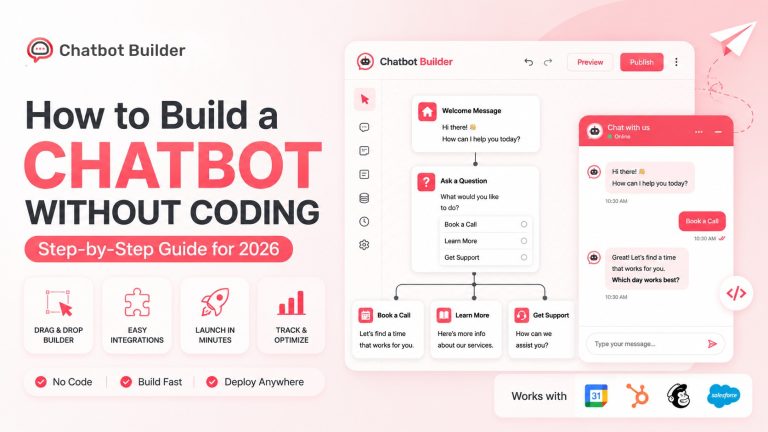
Chatbotbuilder.net is a no-code platform built to handle customer questions with precision while driving your specific business goals. Sales chatbots and Marketing Chatbots, deployed across multiple channels, without writing a line of code. A working lead generation chatbot can genuinely go live the same day you create an account.
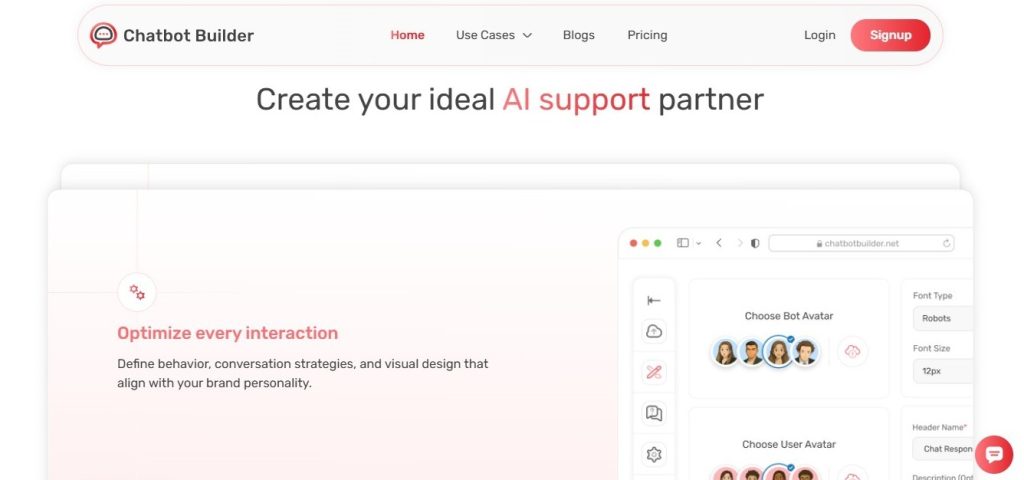
What ChatbotBuilder does: A visual drag-and-drop editor lets you build conversation flows and push them live across your website, Facebook Messenger, Instagram, WhatsApp, and SMS from one place. Built for marketers who want results without needing a developer to get there.
Key features:
- Visual drag-and-drop flow builder with full branching logic
- Native integrations with HubSpot, Salesforce, Mailchimp, ActiveCampaign, and Zapier
- Lead scoring is built directly into the flow editor
- Multi-channel deployment across website, Messenger, SMS, and Instagram
- Pre-built templates for lead capture, appointment booking, and content gating
- Real-time notifications when a high-score lead completes a flow
- Analytics dashboard showing completion rates, drop-off points, and lead volume
Pros:
- Genuinely no-code, the builder works the way it says it does
- One flow deploys across your website and Messenger at the same time without rebuilding
- Templates cut setup time significantly for common flows
- Native CRM sync covers the major platforms without relying entirely on Zapier
Cons:
- Custom integrations outside the native list need Zapier, which adds setup complexity
- The analytics covers core metrics well, but won’t fully replace a dedicated reporting tool for teams that need deep-funnel analysis.
Pricing: There’s a free plan for getting started at lower volumes. Paid plans scale on contacts and channels. Check chatbotbuilder.net directly since pricing updates periodically.
Step-by-Step: Build Your First Lead Generation Chatbot in ChatbotBuilder
Step 1: Go to chatbotbuilder.net and sign up. The free plan is enough to build and test your first flow before spending anything.
Step 2: Pick a chatbot lead qualification or lead capture template from the library. Starting with a working structure is faster and smarter than building from a blank canvas.
Step 3: Rewrite the opening message with specific language tied to your real offer. “Want to see how we cut lead response time in half? Three quick questions” outperforms any generic greeting every time.
Step 4: Replace the template’s default questions with your actual qualification questions. Use button responses wherever you can. They keep completion rates up and make lead scoring easy to set up.
Step 5: Build your branches. High-intent answers route to calendar booking. Lower-intent answers route to a content offer or nurture sequence. Every path should end somewhere useful.
Step 6: Assign point values to answer options and set your SQL threshold. Add a conditional branch at the end: above the threshold shows the booking message, and below the threshold shows the resource offer.
Step 7: Connect your CRM in the integrations panel. Map qualification answers to their corresponding CRM fields. Set up automated tasks for leads that cross your SQL threshold.
Step 8: Copy the widget embed code and paste it into your site’s header. Set your trigger conditions: pricing page after ten seconds, exit-intent on the homepage, mid-scroll on high-intent blog content.
Step 9: Test every branch of the flow yourself as a visitor. Confirm leads land in your CRM with the right fields populated. Fix anything that feels unnatural before real traffic hits it.
Step 10: Two weeks in, check your completion and qualification rates. Drop-off at one specific question means that question needs to be cut or rewritten. Low qualification rates mean the bot is reaching the wrong people.
Find flows already built for your use case at chatbotbuilder.net/templates.
5 Real-World Use Cases for a Lead Generation Chatbot
1. SaaS free trial qualification:
A project management tool puts a lead generation chatbot on its pricing page. Three questions cover team size, current tool, and biggest workflow frustration. Anyone managing ten or more people with a qualifying pain point gets routed directly to a product specialist’s calendar. Smaller teams get a trial link with a matching onboarding guide. Sales focuses entirely on leads that are actually ready. Trial sign-ups go up because the experience fits what each visitor actually needs instead of treating everyone the same.
2. Real estate lead capture:
An agency deploys a lead generation chatbot across its property listing pages. Property type, budget, and timeline. Buyers who are ready within 90 days and above a set budget get connected to an agent through a booking flow inside the chat. Visitors who are still browsing get a neighborhood market report delivered to their inbox. The same traffic that used to produce a handful of form submissions is now producing real, qualified conversations.
3. B2B agency new business:
A marketing agency runs a lead generation chatbot on its case studies page. People reading case studies are already interested, and the bot meets them right there: “Want to see if these results make sense for your business? Takes two minutes.” The flow qualifies by monthly ad spend, industry, and growth goal. Leads above the agency’s minimum threshold trigger a Slack alert with the full conversation transcript before the team reaches out.
4. E-commerce product recommendation:
A nutrition brand builds a lead generation chatbot as a product quiz on their homepage. The health goal drives the whole flow. Email capture happens right before the results appear, framed around personalizing the recommendation. The bot works as a product guide and a lead capture tool at the same time. Every follow-up email is tied to the specific goal the visitor selected, so nothing feels irrelevant or blasted out.
5. Professional services appointment booking:
A law firm uses a lead generation chatbot to screen consultations before they hit the calendar. Legal matter type, urgency, and prior experience with an attorney. Qualified consultations go straight to a booking flow. Inquiries outside the firm’s practice areas get a polite redirect with a referral. The firm stops filling its calendar with calls that were never going to go anywhere and starts booking more of the consultations that actually matter.
Conclusion
A lead generation chatbot works when you’re not. It qualifies prospects, pulls in their details, and drops everything into your CRM with enough context that your sales team already has something to work with before the first conversation starts.
The gap between businesses using a lead generation chatbot and those still relying on static forms keeps growing. One side knows who showed up, what they wanted, and how close they were to buying. The other side submits the same form and waits.
Start with ChatbotBuilder. Use a template. Write five questions that actually mean something for your sales process. Connect your CRM. Put the lead generation chatbot on the pages where real buyers land. Watch the completion rate, the qualification rate, and the close rate. Let those numbers tell you what to change.
The bot works at 2 AM. It works on weekends. It works when your whole team is at a conference. Build it right once, and it keeps going.
Start your free trial at chatbotbuildertoday.